Best Laptop Stands for Home Office and Travel
Our laptop stand buying guide compares aluminum desk risers and foldable travel stands to help you find the best fit for posture, cooling, and portability.
As an Amazon Associate I earn from qualifying purchases. Affiliate links may earn us a commission at no extra cost to you. Read our disclosure.
Quick Picks
Chosen from published specifications, manufacturer documentation, and owner feedback—not hands-on testing. Amazon links are coming soon.
Rain Design mStand Laptop Stand
A one-piece anodized aluminum stand that raises a laptop screen to near eye level and doubles as a passive heat sink, making it a long-standing favorite for permanent desk setups.
SOUNDANCE Adjustable Laptop Stand for Desk
An affordable aluminum-alloy riser with an open, height-adjustable frame that targets desk users who want ergonomic lift and cooling without paying a premium price.
MOFT Invisible Laptop Stand
A nearly flat, origami-style stand made of vegan leather and fiberglass that sticks to the bottom of a bag or laptop sleeve and disappears when not in use.
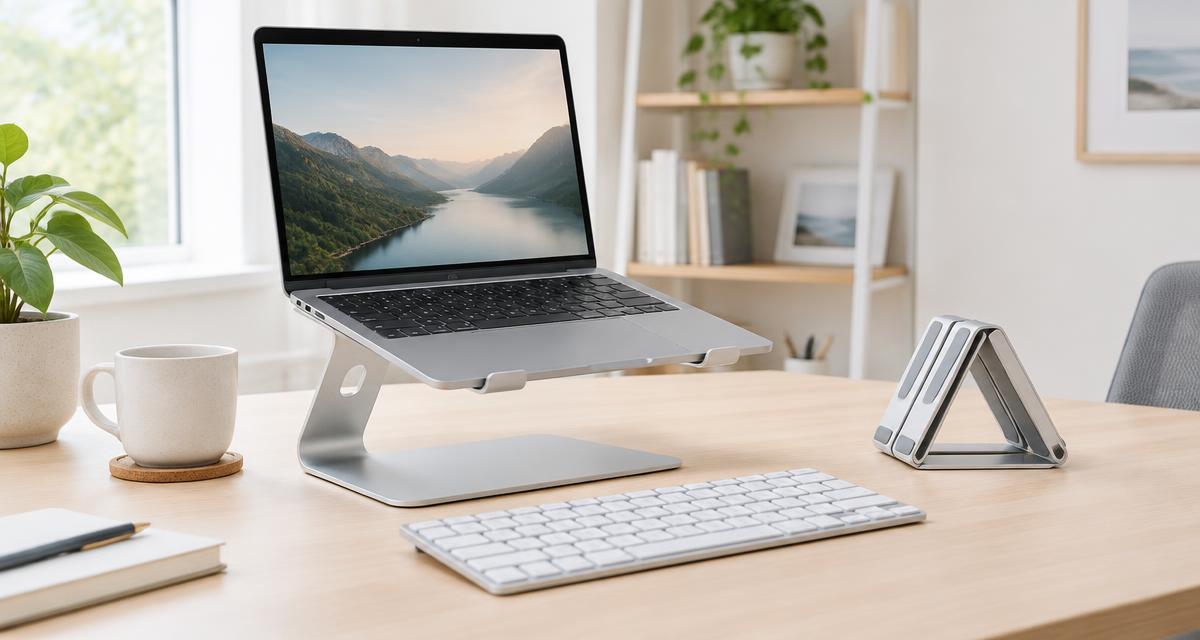
Illustrative image. This guide is research-based buying advice, not a hands-on product review.
Compare the top picks
| Product | Key specs | Pros | Cons | Check availability |
|---|---|---|---|---|
| Rain Design mStand Laptop Stand |
|
|
| |
| Nulaxy C1 Ergonomic Adjustable Laptop Stand |
|
|
| |
| Roost V3 Laptop Stand |
|
|
| |
| MOFT Invisible Laptop Stand |
|
|
| |
| SOUNDANCE Adjustable Laptop Stand for Desk |
|
|
|
Laptop stand reviews: specs and standout features
Rain Design mStand Laptop Stand
A one-piece anodized aluminum stand that raises a laptop screen to near eye level and doubles as a passive heat sink, making it a long-standing favorite for permanent desk setups.
- Width 10 in (253 mm), depth 7.5 in (190 mm), height 5.9 in (150 mm)
- Weight: about 3 lb (1.36 kg)
- Single-piece anodized aluminum construction
- Raises screen roughly 6 inches with a built-in tilt angle
- 2-inch cable outlet for routing cords through the base
- Fixed (non-folding, non-adjustable) design; fits laptops up to about 10.4 in deep
Pros
- Extremely sturdy one-piece build with no wobble
- Aluminum body helps dissipate heat from the laptop base
- Clean, minimalist design that matches MacBooks
Cons
- Fixed height and angle, no adjustability
- Not foldable, so it is not ideal for travel
- Heavier and bulkier than most budget stands
Nulaxy C1 Ergonomic Adjustable Laptop Stand
A dual-rod, fully adjustable riser with a vented aluminum composite platform, built for people who want height flexibility at a low cost without sacrificing stability.
- Dual-support rod mechanism rated to hold up to 22 lb of laptop weight
- Compatible with 10 to 17 inch laptops
- Enclosure material: aluminum composite panel with silicone pads
- Geometric heat-vent top panel for airflow
- Dual-foldable hinge design that collapses flat for storage or transport
- Multiple height and angle adjustment positions
Pros
- Adjustable height and angle for varied desks and chairs
- Folds flat for packing into a bag
- Vented design and silicone pads help with cooling and grip
Cons
- Aluminum composite panel feels less premium than solid aluminum stands
- Dual-rod hinges can loosen slightly with heavy daily folding over time
- Larger footprint when open than minimalist fixed stands
Roost V3 Laptop Stand
An ultra-light folding stand built from carbon-infused plastic that packs down to the size of a water bottle, aimed squarely at travelers and hybrid workers.
- Weight: 6 oz (178 g)
- Folded size: 1 x 1.5 x 13 inches
- 7 selectable height settings with a 6.5 to 12.5 inch screen lift range
- Self-adjusting PivotGrips fit laptops from 12 to 18 inches
- Rigid folding truss-frame structure for stability
- No cable routing or built-in cooling vents
Pros
- Among the lightest and most packable stands available
- Multiple height settings accommodate sitting or standing use
- Rigid frame resists wobble despite the low weight
Cons
- Premium price relative to its minimal materials
- No cable management or ventilation cutouts
- Requires a short learning curve to fold and unfold correctly
MOFT Invisible Laptop Stand
A nearly flat, origami-style stand made of vegan leather and fiberglass that sticks to the bottom of a bag or laptop sleeve and disappears when not in use.
- Standard size dimensions: 9.84 x 7.09 x 0.16 in (250 x 180 x 4.1 mm)
- Standard weight: 6.77 oz (192 g); Large version: 9.59 oz (272 g)
- Materials: vegan leather, fiberglass, magnets, metal sheets, PC
- Two adjustable angle modes: 25 degrees for viewing, 15 degrees for typing
- Supports up to 11 lb of laptop weight
- Ventilation cutouts for airflow; non-adhesive, reusable design
Pros
- Extremely thin and light, barely noticeable in a bag
- Two viewing angles cover both typing and video calls
- No adhesive residue, so it can move between laptops
Cons
- Lifts the laptop only slightly compared to taller aluminum stands
- Fiberglass hinge can feel less rigid than metal constructions
- Not compatible with laptops that have rubber feet protruding on the bottom
SOUNDANCE Adjustable Laptop Stand for Desk
An affordable aluminum-alloy riser with an open, height-adjustable frame that targets desk users who want ergonomic lift and cooling without paying a premium price.
- Compatible with 10 to 17.3 inch notebooks
- Aluminum alloy construction with silicone anti-slip pads
- Height-adjustable, open-frame design for airflow
- Two-step, tool-free setup
- Raises the laptop to create space underneath for a keyboard or other items
- Supports typical ultrabook and mid-size laptop weights
Pros
- Budget-friendly compared to premium aluminum stands
- Open frame promotes airflow around the laptop chassis
- Simple assembly with no tools required
Cons
- Build quality is lighter-gauge than pricier aluminum stands
- Not as compact when folded as dedicated travel stands
- Limited number of height presets compared to multi-position stands
Why use a laptop stand at all
A laptop's built-in screen and keyboard sit at a fixed distance from each other, which forces most people into a compromise: either the screen is at a comfortable height and the keyboard is too high, or the keyboard is comfortable and the screen is too low. A laptop stand breaks that compromise by raising the screen independently, so it can be paired with an external keyboard and mouse for a setup closer to a proper desktop workstation.
Raising the display toward eye level is widely recommended by ergonomics guidance as a way to reduce the tendency to hunch the neck and shoulders forward during long sessions at a screen. This is general posture advice rather than a medical claim, and results vary by person, desk, and chair, but the basic physics of screen height are consistent across published ergonomics resources.
Beyond posture, elevating a laptop off a flat desk surface also opens up airflow underneath the chassis. Many laptops draw cooling air through vents on the bottom panel, and placing the machine flat on a desk or soft surface can restrict that airflow. Stands with open frames or ventilation cutouts help air move more freely around the laptop body.
Fixed aluminum stands versus adjustable and folding designs
Fixed stands like the Rain Design mStand are built from a single piece of aluminum with no moving parts. That simplicity means there is nothing to loosen, wobble, or break over years of use, and the solid metal body can act as a passive heat sink that helps draw warmth away from the laptop's underside. The tradeoff is that the height and tilt angle are set at the factory, so the stand only works well for people whose desk and chair happen to match that fixed geometry.
Adjustable stands such as the Nulaxy C1 and the SOUNDANCE riser use hinges or telescoping rods to let the user dial in a specific height and angle. This flexibility is useful for shared desks, standing-desk setups, or anyone who wants to fine-tune the viewing angle for video calls versus focused typing. The hinges and rods do add moving parts that can loosen slightly with years of repeated folding, so the tradeoff is long-term durability for short-term flexibility.
Folding travel stands, including the Roost V3 and the MOFT Invisible Stand, prioritize collapsing into a thin, light package over raw rigidity or heat dissipation. They are designed to live in a laptop bag and come out for use in a coffee shop, co-working space, or hotel room, then fold flat again when it's time to move. Buyers who split time between a home office and frequent travel often end up owning one fixed stand for the desk and one folding stand for the road.
How much height lift do you actually need
The right amount of screen lift depends on the laptop's native screen height relative to seated eye level, which varies by desk height, chair height, and the user's own height. Stands with a fixed lift, like the mStand's roughly 6-inch rise, work well for many standard desk and chair combinations but may not be tall enough for very tall users or short enough for compact desks.
Adjustable stands remove much of the guesswork because they let the user move the laptop up or down until the top of the screen roughly lines up with eye level. The Roost V3's 6.5 to 12.5 inch range and the Nulaxy C1's multiple positions both cover a wide span of desk and chair combinations, which is useful if more than one person uses the same desk or if the stand will travel between different work locations.
Thin stands like the MOFT Invisible Stand lift the laptop only an inch or two, which is enough to improve typing angle and airflow but will not bring the screen close to eye level on its own. These low-profile stands work best for people who mainly want a slight ergonomic boost and better airflow while keeping a compact footprint, rather than those chasing a full standing-desk-style screen height.
Weight capacity, build material, and laptop compatibility
Laptop sizes and weights vary widely, from 2-pound ultrabooks to heavier 17-inch gaming or workstation laptops, so it is worth checking a stand's stated weight capacity and depth compatibility before buying. The Nulaxy C1's dual-rod frame is rated for up to 22 pounds and fits laptops from 10 to 17 inches, which covers nearly every consumer laptop on the market, while the MOFT Invisible Stand's lighter fiberglass-and-leather construction is rated to about 11 pounds, which is still enough for the vast majority of laptops but worth noting for heavier gaming machines.
Material also affects both durability and cooling. Solid aluminum designs like the mStand and SOUNDANCE stand can act as heat sinks and generally hold up well to years of repositioning a laptop. Composite and fiberglass designs used in the Nulaxy C1's top panel and MOFT's folding body save weight, which matters for portability, but may feel slightly less rigid under a heavier laptop than a one-piece metal design.
It is also worth double-checking depth compatibility for laptops with unusual footprints. The Rain Design mStand, for example, is designed for laptops with a depth under about 10.4 inches, which covers most 13 to 16 inch laptops but could be tight for some larger 17-inch gaming laptops with deep chassis.
Portability and desk footprint
For a stand that will never leave a desk, portability is a non-issue and buyers can prioritize stability and cooling instead, which favors solid aluminum designs like the mStand. But for anyone who regularly moves between a home office, a coworking space, or client sites, how a stand folds and how much it weighs becomes just as important as its ergonomic benefits.
The Roost V3 and MOFT Invisible Stand represent two different approaches to portability. The Roost folds into a narrow 1 x 1.5 x 13 inch bundle that slides into a bag's laptop sleeve pocket, prioritizing a small folded footprint over ultra-thinness. The MOFT stand instead stays nearly flat at all times, at around 0.16 inches thick, so it can be tucked flush against the back of a laptop or inside a sleeve without adding noticeable bulk.
Mid-size folding stands like the Nulaxy C1 sit between these extremes: they fold flat enough to pack in a backpack's main compartment but are bulkier than the Roost or MOFT when collapsed. For daily commuters who want more adjustability on the go, that tradeoff is often worth it, while minimalist travelers may prefer the thinner, lighter options.
Setting up your laptop stand correctly
A laptop stand works best as part of a complete ergonomic setup rather than as a standalone fix. Raising the screen to eye level typically also raises the built-in keyboard out of a comfortable typing position, so most people pair a stand with a separate external keyboard and mouse once the laptop is elevated. This is general setup advice, not a guarantee of pain relief, and anyone with ongoing discomfort should consult a qualified professional rather than relying on equipment changes alone.
When positioning the stand, aim to have the top third of the screen roughly at eye level while sitting in a natural, upright posture, and keep the screen at arm's length or slightly closer. Many adjustable stands make this easy to fine-tune, while fixed-height stands may need to be paired with a slightly taller or shorter chair to hit the right eye line.
Finally, consider cable management and desk layout as part of the setup. Stands with a cable cutout, like the mStand, help keep a charging cable and any dongles routed neatly behind the laptop rather than draped across the desk, which keeps the workspace both tidier and safer to navigate around.
Frequently asked questions
Do I need an external keyboard and mouse if I use a laptop stand?
Yes, for most people. Once a stand raises the screen to a comfortable eye level, the laptop's built-in keyboard is usually too high or too far away to type on comfortably, so an external keyboard and mouse let you keep both the screen height and the typing position comfortable at the same time.
Will a laptop stand actually make my laptop run cooler?
It can help in many cases. Stands with open frames, mesh, or ventilation cutouts allow more air to flow around and under the laptop's bottom panel compared to setting it flat on a desk, and solid aluminum stands can also draw some heat away as a passive heat sink. How much difference it makes depends on the laptop's internal cooling design and workload.
Can one stand work for both a MacBook and a Windows laptop?
Most of the stands in this guide are brand-agnostic and specify a compatible size range rather than a specific laptop model, so they generally work across MacBooks, Windows ultrabooks, and Chromebooks within the listed depth and weight limits. It's still worth checking the stated compatible screen-size range and weight capacity against your specific laptop before buying.
Is a fixed stand or an adjustable stand better for a shared desk?
Adjustable stands tend to work better for shared or hot-desk setups because different users can change the height and angle to suit their own posture without needing a different stand entirely. Fixed stands are better suited to a single person's permanent desk where the height and angle rarely need to change.
How thin a stand do I need for travel?
That depends on how you pack. If you want a stand that can slide into a laptop sleeve's front pocket without adding noticeable bulk, an ultra-thin design like the MOFT Invisible Stand is a good fit. If you have a dedicated compartment in a backpack and don't mind a slightly larger folded bundle, a stand like the Roost V3 offers more height-adjustment range in exchange for a bit more packed volume.
What laptop weight should I check before buying a stand?
Check both the laptop's actual weight and its footprint (width and depth) against the stand's stated weight capacity and compatible size range. Larger 17-inch gaming or workstation laptops are often heavier and deeper than the 13 to 15 inch laptops many stands are primarily designed around, so it's worth confirming compatibility rather than assuming a stand fits all sizes.